# Overview

Chainlens web3 data and analytics platform

<figure><img src="/files/j3jjdKTwzAmRSvsR3u10" alt=""><figcaption><p>The Chainlens Dashboard</p></figcaption></figure>

## Overview

Chainlens by Web3 Labs, is the go-to appchain and blockchain explorer for EVM-compatible networks, designed to demystify blockchain assets and smart contracts. With a focus on ease of use, Chainlens offers&#x20;

\- Full NFT and token support (ERC-20, ERC-721, ERC-1155)

\- Advanced search, filter, and sort features

\- Customisation tailored to your brand

\- Robust API for streamlined reporting

Used by hundreds of companies and protocols globally, Chainlens has accelerated blockchain adoption and made it easier to manage digital assets.

### Supported chains

Chainlens supports both public and private blockchains and appchains. Some of the supported networks and clients include:

**Public networks**

Ethereum mainnet and testnets using a variety of clients including:

* Hyperledger Besu
* Geth
* Nethermind&#x20;
* Erigon and others

**Appchains/layer 2 networks**

* OP Stack (Optimism, Base)
* Polygon Edge and ZK-EVM
* Linea
* Substrate
* *and more*

**Private networks**

* [Hyperledger Besu](https://www.hyperledger.org/projects/besu)
* [Quorum](https://github.com/jpmorganchase/quorum)

### How it works

Chainlens ingests raw blockchain data and restructuring it to provide information about activity taking place on the blockchain.

This information is presented in its user interface. Chainlens provides views of the following blockchain data:

* Tokens
* NFTs
* Accounts
* Smart contracts
* Events
* Transactions
* Blocks

By browsing to the relevant tab in Chainlens, you are presented with the associated blockchain data.

In addition, you can use its search functionality to locate specific accounts, blocks, transactions or contracts by their address or hash.

The [Features section](/features/navigation) provides an in-depth overview.


# Chainlens versions

Explore Chainlens, the blockchain explorer, featuring Hosted and Developer editions. Sign up now for the Hosted edition or try out the Developer edition for free.

Chainlens comes in two editions:

* Hosted
* Developer edition

It's also available on-prem or in your cloud subscription, but we encourage you to contact us via [email](mailto:hi@web3labs.com?Subject=Sirato) or [here](https://www.chainlens.com/contact) if you'd like to go with either of these options.

### Hosted edition

The hosted edition is deployed and managed by the Chainlens team, and is priced based on the transaction volumes in your network.

It can be white-labelled using your own branding and hosted under your own custom domain.

You can sign up [here](https://www.web3labs.com/blockchain-explorer-sirato-plans).

### Developer edition

A feature-limited, developer edition of Chainlens is available for evaluation purposes.&#x20;

It is made available via GitHub repository located [here](https://github.com/web3labs/sirato-free).

It allows you to run up a Chainlens instance using Docker Compose or Kubernetes orchestration.


# Navigation

Explore with Chainlens – your intuitive blockchain explorer. Dashboard metrics, NFTs, tokens, accounts, contracts, and advanced sorting at your fingertips.

Video walkthrough

The below walkthrough provides an overview of a number of its key features.&#x20;

{% embed url="<https://youtu.be/qVVxJKB194c>" %}

## A tour of Chainlens

Chainlens provides an intuitive user experience, driven by the menu on the left-hand side of the screen. Clicking on the relevant menu item will take you to the associated page.&#x20;

### Dashboard <a href="#dashboard" id="dashboard"></a>

When you browse to a Chainlens instance, you are presented with a dashboard. The Chainlens dashboard provides a summary of key metrics of the blockchain contracts, including:

* Total transactions, token contracts and peers
* Graphical transaction count broken down by transaction type (contract creation, contract transaction, currency transfer)
* Most active contracts
* Fungible (ERC20 and ERC777) versus non-fungible token contracts (ERC721)

<figure><img src="/files/j3jjdKTwzAmRSvsR3u10" alt=""><figcaption><p>The dashboard view</p></figcaption></figure>

### NFTs

The NFTs view provides a view of all NFTs deployed on the network. These are tokens that adhere to the [ERC-721](http://eips.ethereum.org/EIPS/eip-721) and [ERC-1155](https://eips.ethereum.org/EIPS/eip-1155) Ethereum standards respectively.

<figure><img src="/files/o7tM1t31EMNKWdqHjoSv" alt=""><figcaption><p>The NFTs view</p></figcaption></figure>

When you click on a specific NFT, you are taken to the collection view for that NFT.

You can refer to the [dedicated section](/features/nfts) in the docs on NFTs for more information.

### Tokens

The tokens view provides a view of all fungible, [ERC-20](https://eips.ethereum.org/EIPS/eip-20) tokens deployed in the network.

<figure><img src="/files/1d76Sf5vm9UwHlCMd3dx" alt=""><figcaption><p>The tokens view</p></figcaption></figure>

If we click on one of our tokens, we get more information about it (as in the Contracts view).

<figure><img src="/files/SfLgW4z4kLfnT8LNukY9" alt=""><figcaption><p>The token details view</p></figcaption></figure>

Here you can see the attributes of the token.

<figure><img src="/files/wsaDkITxwlm1ms60Ettc" alt=""><figcaption><p>The token details pane</p></figcaption></figure>

You can also see details of the transfer events that have taken place for that token and who the top holders are.

<figure><img src="/files/TRBm0rtWdfHU6KXUODdI" alt=""><figcaption><p>The token transfers, transactions and holders view</p></figcaption></figure>

### Accounts

The accounts view displays all active accounts on your network.

<figure><img src="/files/ycOMjby6eHwCTVThT26X" alt=""><figcaption><p>The accounts view</p></figcaption></figure>

Accounts are arranged by their balance in the tokens native currency, with the largest balance accounts first. Its also possible to sort accounts based on the:

* Tokens
* NFTs
* Transactions

Click on an account will take you to the account-specific view for it.

<figure><img src="/files/SWoNdEmpwRlfQGaXzuqA" alt=""><figcaption><p>Account details</p></figcaption></figure>

This contains details of the transactions, tokens and NFTs associated with the account.

### Contracts

The contracts view displays all contracts that have been deployed to your network.

<figure><img src="/files/AvKz3uMW76xDckLpPdtN" alt=""><figcaption><p>The contracts view</p></figcaption></figure>

Here you can see details of all contracts deployed to the network. Those contracts that comply with well-defined interfaces are automatically tagged with a type in the **Type** column to reflect this. For example, **ERC20**, **ERC777** for fungible token contracts, **ERC721** for non-fungible token contracts, **ERC1155** for hybrid tokens (which defines both fungible and non-fungible tokens) and Custom for those that have not been registered in the contract registry.

The **Name** column provides the contract name if the contract is registered in the Chainlens contract registry. To learn more about the contract registry, head [here](https://docs.epirus.io/metadata.html).

When you click on a contract, you are taken into the contract details page which has various information about the contract.

Here you can see details of all transactions associated with the contract and events emitted by these transactions. If the contract is registered in the registry, events and their parameter names and values will be decoded.

<figure><img src="/files/WM53P5I2mfweGDyUVIJm" alt=""><figcaption><p>The contracts details view</p></figcaption></figure>

Private transactions are labelled with a **Private** label. They will only be decipherable if the node that the Chainlens instance is connected to is privy to the transaction.

### Events <a href="#transactions" id="transactions"></a>

The events view provides details of all events taking place on the blockchain.

<figure><img src="/files/vzetaK4K6TzLb1zCH44d" alt=""><figcaption><p>The events view</p></figcaption></figure>

When you click on the **Address** or **Transaction Hash** associated with an entry it will take you to the relevant smart contract address or transaction view in Chainlens.

### Transactions

The Transactions view provides the details of individual transactions, including private transactions when supported by your blockchain.

<figure><img src="/files/igPkhPVOTYOisMGFMelU" alt=""><figcaption><p>The transactions view</p></figcaption></figure>

Clicking on a transaction will take you to the transaction details view.

<figure><img src="/files/fvTwVMNpnbNRNlM7QXD9" alt=""><figcaption><p>The transaction details view</p></figcaption></figure>

When you view transaction details you'll find view lower-level details, such as the input byte code.

<figure><img src="/files/c7Z7G8IxFs8y437H4W88" alt=""><figcaption><p>Viewing the input bytecode associated with a transaction</p></figcaption></figure>

### Blocks

The blocks view provides details of all blocks being generated on the network.

<figure><img src="/files/l53tFvbeQuhMvfTTUyJN" alt=""><figcaption><p>The blocks view</p></figcaption></figure>

Clicking on a block will take you to the block details view, which displays the transactions in the block and other details.

<figure><img src="/files/riuLE9FEQi44zaoyVJ6Z" alt=""><figcaption><p>The block details view</p></figcaption></figure>

As with the transactions view, technical details are available here too under the **Additional Details** menu. Here you can see details such as the block difficulty and gas consumed.

<figure><img src="/files/eEohrQ8839bnBhOaG6Zu" alt=""><figcaption><p>The additional details view</p></figcaption></figure>

### Accounts

Clicking on an address that is not associated with a smart contract, i.e. it holds Ether, will bring up the account view, which displays the current balance and transactions associated with the account.

<figure><img src="/files/z5f6iQ0jjYhawvbLYPKp" alt=""><figcaption><p>The account details view</p></figcaption></figure>

### Search

The search box in the top-right corner of the screen allows you to search by various criteria, including:

* Contract address
* Account address
* Transaction hash
* Block hash

<figure><img src="/files/SLPdmm5f5AONjvALo5SN" alt=""><figcaption><p>The search bar</p></figcaption></figure>

If a match is found the associated contract, account, transaction or block details will be displayed.

### Advanced sorting and filters <a href="#advanced-sorting-and-filters" id="advanced-sorting-and-filters"></a>

Another key feature is the addition of sorting and filters in Chainlens. This enables users to find very active tokens or contracts by sorting or filtering by key attributes. For instance, contracts can be sorted by transaction count, creation date or last execution.

Each of the different views in Chainlens provides relevant sorting functionality.

<figure><img src="/files/2jtXVrTB7hTn78YKOnz4" alt=""><figcaption><p>Sorting contracts by various attributes</p></figcaption></figure>

The filters provided also allow you to view subsets of the available data, such as only displaying ERC-721 or ERC-1155 tokens in the Tokens view.

<figure><img src="/files/QWy0KIlj5BA68pl6LQHn" alt=""><figcaption><p>Filtering tokens by various attributes</p></figcaption></figure>

As with the sorting functionality, all of the different views in Chainlens have various filters you can apply.

### Network

The **Network** view is an optional view, that details the node Chainlens is connected to and its peers on the network.


# NFTs

Non-fungible Token Support

Chainlens has full support for NFTs. There are two types of NFT token supported. Those that support the original [ERC-721](https://eips.ethereum.org/EIPS/eip-721) standard, and those that support the [ERC-1155](https://eips.ethereum.org/EIPS/eip-1155) multi-token standard.

You can access the NFT view in Chainlens by clicking the navigation item.

<figure><img src="/files/n4fjMwSaPcG384qZ9Do7" alt="" width="287"><figcaption></figcaption></figure>

### Common issues with NFTs

In order for NFTs to be rendered correctly in Chainlens, there are a few details that the creators need to get correct. Chainlens helps creators understand where the errors lies in the event that NFTs are not deployed correctly on the network.

Clicking this link takes you to the listing page for all NFTs.

<figure><img src="/files/OE7SfO0MCsq0bIYFnaAO" alt=""><figcaption></figcaption></figure>

From here you can click on a specific NFT and view information the collection its from.

<figure><img src="/files/4b8WQe2NXGqFgRVa4rGi" alt=""><figcaption></figcaption></figure>

If you click on a specific NFT you see information about it including its name, image, description and any attributes.

<figure><img src="/files/CCer7x6l9VBYzu6PaOgW" alt=""><figcaption><p>An NFT with a large number of attributes</p></figcaption></figure>

Additionally, we recognise that sometimes information is missing from NFTs preventing from them rendering correctly in explorers. To address this we've added additional information in Chainlens for users.

To unpack this, its helpful to discuss how NFTs are implemented on Ethereum networks.

### Components of an NFT

NFTs are created by smart contracts implementing the [ERC-721](https://eips.ethereum.org/EIPS/eip-721) or [ERC-1155](https://eips.ethereum.org/EIPS/eip-1155) standards.

ERC-721 is the original NFT standard. ERC-1155 came along later adding the ability to use a single smart contract for managing multiple collections of fungible and non-fungible tokens.

You'll see both types of tokens in Chainlens, where ERC-721 tokens are labelled Non-Fungible, whereas ERC-1155 are labelled Hybrid.

<figure><img src="/files/UJhGTTViljeSeQ5t83hi" alt=""><figcaption><p>An ERC-721 NFT labelled Non-Fungible</p></figcaption></figure>

<figure><img src="/files/s1y4SysSfL9LXbdeHYD5" alt=""><figcaption><p>An ERC-1155 NFT labelled Hybrid</p></figcaption></figure>

### Metadata

Both standards contain an optional metadata extension which is used to provide information about the assets contained by NFTs.

These interfaces are below.

**ERC-721 Metadata Interface**

```solidity
interface ERC721Metadata /* is ERC721 */ {
    /// @notice A descriptive name for a collection of NFTs in this contract
    function name() external view returns (string _name);

    /// @notice An abbreviated name for NFTs in this contract
    function symbol() external view returns (string _symbol);

    /// @notice A distinct Uniform Resource Identifier (URI) for a given asset.
    /// @dev Throws if `_tokenId` is not a valid NFT. URIs are defined in RFC
    ///  3986. The URI may point to a JSON file that conforms to the "ERC721
    ///  Metadata JSON Schema".
    function tokenURI(uint256 _tokenId) external view returns (string);
}
```

**ERC-1155 Metadata Interface**

```solidity
interface ERC1155Metadata_URI {
    /**
        @notice A distinct Uniform Resource Identifier (URI) for a given token.
        @dev URIs are defined in RFC 3986.
        The URI MUST point to a JSON file that conforms to the "ERC-1155 Metadata URI JSON Schema".       
        @return URI string
    */
    function uri(uint256 _id) external view returns (string memory);
}
```

This metadata extension, named `tokenURI(uint256 _tokenId)` and function `uri(uint256 _id)` in ERC-721 and ERC-1155 contracts respectively returns a URI string which can be used to obtain additional data about an NFT encoded in JSON.

This URI string will usually resolve to a URL. The URL is often hosted on the decentralised IPFS network, but it could be a location on a traditional storage location, such as an AWS S3 bucket.

The format of the JSON schemas is as per the below.

**ERC-721 URI schema**

```json
{
    "title": "Asset Metadata",
    "type": "object",
    "properties": {
        "name": {
            "type": "string",
            "description": "Identifies the asset to which this NFT represents"
        },
        "description": {
            "type": "string",
            "description": "Describes the asset to which this NFT represents"
        },
        "image": {
            "type": "string",
            "description": "A URI pointing to a resource with mime type image/* representing the asset to which this NFT represents. Consider making any images at a width between 320 and 1080 pixels and aspect ratio between 1.91:1 and 4:5 inclusive."
        }
    }
}
```

**ERC-1155 URI schema**

```json
{
    "title": "Token Metadata",
    "type": "object",
    "properties": {
        "name": {
            "type": "string",
            "description": "Identifies the asset to which this token represents"
        },
        "decimals": {
            "type": "integer",
            "description": "The number of decimal places that the token amount should display - e.g. 18, means to divide the token amount by 1000000000000000000 to get its user representation."
        },
        "description": {
            "type": "string",
            "description": "Describes the asset to which this token represents"
        },
        "image": {
            "type": "string",
            "description": "A URI pointing to a resource with mime type image/* representing the asset to which this token represents. Consider making any images at a width between 320 and 1080 pixels and aspect ratio between 1.91:1 and 4:5 inclusive."
        },
        "properties": {
            "type": "object",
            "description": "Arbitrary properties. Values may be strings, numbers, object or arrays."
        }
    }
}
```

### Correct NFT Deployment

When NFTs are minted on a network, for them to render correctly, they all need to be present in the smart contract creating the NFTs:

* Lookup by token id returns a metadata URI
* The metadata URI is accessible
* The metadata URI contains an image URI property
* This image URI is accessible and contains a valid image format

If any of the above steps fail then an NFT will not render correctly.

Given the series of stages required to render NFTs correctly, Chainlens now makes it clear where the problems lie when NFTs aren't being rendered correctly.

### Digging Deeper into NFTs in Chainlens

When you navigate to an NFT collection page, the Collections tab displays the NFTs in the collection. Provided the NFT has been deployed correctly you will see preview images for individual NFTs in the collection.

<figure><img src="https://lh7-us.googleusercontent.com/ygdhftQT9ni8iobxyJWJNtiMz9Cb5zfTTGnPKqwG9eJD_3SKxh6yzX6WBSJQmItR2jYo_FDIVUDOZdTyAlYaThdODRBaHOrFDgiasvsXpxiFTAFCYLz7wi4muEDyZsNbjF5HJKRo5KOkety0fmrXWg" alt=""><figcaption></figcaption></figure>

Clicking on one of the NFTs will show you information about that specific NFT. In the below example, we have the name, NFT type, address, metadata URL and attributes.

<figure><img src="/files/09hBsh6RGsSaIvuWjfNH" alt=""><figcaption></figcaption></figure>

If you click on the metadata URL hyperlink you will be able to see the metadata associated with the NFT.

In this instance, it's hosted on IPFS.

<figure><img src="/files/YwyqNVp67lHj7OwMMmwY" alt=""><figcaption></figcaption></figure>

If there are any issues with the rendering of the NFT, it's straightforward to see where the problem lies.

* If there is no metadata for the token, the metadata URL will be blank
* If the metadata URL is not accessible, a No Metadata image is displayed
* If the image URI is not accessible, a blank image is displayed

<figure><img src="https://lh7-us.googleusercontent.com/kIb-t-fxQtuwqU9paEaKtdb71T8WIdM6GlQ0RdE01182phb-yIkQiKCmeE37wVUcNWstXuc_4hF09BswrAqP3qCU-6d-nIKW7IGdPagXJVYfPC4xmM5ZnTRCD-tAFcwVed3xzqMCXJ_HfJ_VZbaw3A" alt="" width="188"><figcaption><p>An NFT without metadata</p></figcaption></figure>

<br>


# REST API

Chainlens provides a RESTful API which can be used for bespoke reporting.

## Video walkthrough

The below walkthrough provides an overview of its REST API.

{% embed url="<https://youtu.be/exXi4-5M6Z8>" %}

### Accessing the OpenAPI endpoint

To access the Swagger docs for the API, which allow you to easily query the API, head to `<your-instance-url>/api`.

Swagger also makes it straight forwards to test API queries.

<figure><img src="/files/LW8YduaEFf8QBfkGBQ15" alt=""><figcaption><p>The OpenAPI endpoint</p></figcaption></figure>

This API makes available all data you see in the user interface. This, combined with the filtering functionality and the contract registry, allows you to easily create custom reports for your blockchain applications, such as details of all transfer events associated with a specific token.


# Mobile Experience

Chainlens provides a fully responsive user experience.

Although primarily intended for using with a desktop computer or laptop, we designed a great mobile experience too.

<figure><img src="/files/v6eiDuaTWluoxPSTCQNo" alt="" width="375"><figcaption></figcaption></figure>

The mobile experience makes available all of the core functionality of the explorer such as the token, contract, address, transaction and block views along with all of the filtering and searching functionality.

### Navigation

Navigation is performed via the menu at the side of the screen.

<figure><img src="/files/Fg56cy4mMPbqFoxXQLwA" alt="" width="375"><figcaption><p>The navigation bar for the mobile experience</p></figcaption></figure>

### Features

The mobile experience contains all of the data views for contracts, tokens, events, transactions, blocks and the network. It also provides filtering and sorting functionality.

### Contracts

The contracts view shows all contracts.

<figure><img src="/files/V2lEfKbpwuJCnMiyVh3c" alt="" width="375"><figcaption><p>The contracts view on mobile</p></figcaption></figure>

Clicking on a contract takes you to the contract details.

<figure><img src="/files/i5XsXXWDvNt4u5IsBBGq" alt="" width="297"><figcaption><p>The contract details view on mobile</p></figcaption></figure>

### Filtering and sorting <a href="#filtering-and-sorting" id="filtering-and-sorting"></a>

You also have sorting and filters available for all of your list views.

<figure><img src="/files/HRx3utL1vrZccGPkkMor" alt="" width="333"><figcaption><p>Creating filters on mobile</p></figcaption></figure>

This allows you to filter for ERC-20 and ERC-777 contracts created in the past month.

### Tokens

Navigating to the tokens page we have all tokens listed.

<figure><img src="/files/pb2HEl1cWMXXx0IwSWNn" alt="" width="375"><figcaption><p>The tokens view on mobile</p></figcaption></figure>

We can click on a token to view individual token details.

<figure><img src="/files/F0oxFiC8jXsV2wPB3VGK" alt="" width="331"><figcaption><p>The token details view on mobile</p></figcaption></figure>

### Events

The events view displays events emitted by transactions.

<figure><img src="/files/BeYGOEhnpTLwaAWPraDm" alt="" width="374"><figcaption><p>The events view on mobile</p></figcaption></figure>

### Accounts

We also can view balances associated with accounts when we browse to an account which is associated with an Ethereum wallet, i.e. not a smart contract address.

<figure><img src="/files/J5GsUvDZJtGx6J1PFt7V" alt="" width="374"><figcaption><p>Viewing an account address on mobile</p></figcaption></figure>

### Transactions

The transactions view lists all transactions.

<figure><img src="/files/ZL12Xc1kYEjJ3uStexkQ" alt="" width="375"><figcaption><p>The transactions view on mobile</p></figcaption></figure>

Clicking on a transaction provides the transaction details.

<figure><img src="/files/zqZMobiT1oLnAwf7XkcE" alt="" width="314"><figcaption><p>The details of a transaction on mobile</p></figcaption></figure>

### Blocks

Likewise the blocks view lists all blocks.

<figure><img src="/files/8Xg1j7Je0HWlBGZLXMGE" alt="" width="374"><figcaption><p>The blocks view on mobile</p></figcaption></figure>

Again, clicking on a block provides the block details with associated transactions.

<figure><img src="/files/QJumtxF7r1ulC0shDIx9" alt="" width="314"><figcaption><p>The block details view on mobile</p></figcaption></figure>


# Source Code Verification

Chainlens block explorer provides a source code verification feature that allows deployed contracts on blockchain networks to be verified and interacted with via the Chainlens user interface.

## Video Walkthrough

The below video demonstrates how to upload smart contract source code and interact with the smart contracts from within Chainlens.

{% embed url="<https://www.youtube.com/watch?v=52CUs7aQB8Q>" %}
Overview of source code verification in Chainlens
{% endembed %}

## Prerequisites

1. You should have a smart contract written in Solidity, compiled, and deployed to your preferred EVM-compatible network. You should be able to locate the contract in Chainlens using the contract's address.
2. You have the compiled source code and metadata. [Read more about contract metadata. ](https://docs.soliditylang.org/en/v0.8.17/metadata.html)

## Getting the Contract Metadata

1. Using `solc --metadata` command as explained in the [solidity documentation](https://docs.soliditylang.org/en/v0.8.17/metadata.html).&#x20;
2. The contracts metadata can be found in the `artifacts/build-info/` directory as a .json file for hardhat projects.
3. Truffle adds the contract's compiled files in the `build/contracts/` folder.

## Source Code Verification

On the view of the contract in Chainlens click on the sources tab.

\
From the sources tab, upload the contract's solidity source code and the generated metadata.

<figure><img src="/files/cXyRfEykqQyT6druJPNr" alt=""><figcaption></figcaption></figure>

<figure><img src="/files/RlSWoHdIAzdaClZr0tCz" alt=""><figcaption></figcaption></figure>

The source code verification status will be changed, and the contract's source codes and ABI will be visible after successful verification.

<figure><img src="/files/fC7fhP7HmaIjW4VWEXAl" alt=""><figcaption></figcaption></figure>

<figure><img src="/files/XjwdHYcF9vA96mQY7HCJ" alt=""><figcaption></figcaption></figure>

## Contract Interaction

You can now interact directly with the contract in Chainlens via the read and write tabs in the UI.

<br>

<figure><img src="/files/rCbSHSt8GR00qlvsIzhe" alt=""><figcaption></figcaption></figure>

<figure><img src="/files/fFDdhBMUrOKHMj1cC1j1" alt=""><figcaption></figcaption></figure>

<figure><img src="/files/NhrqXPyiC0jEAcErYtTw" alt=""><figcaption></figcaption></figure>


# Chain Syncing

Chainlens Blockchain Explorer provides node synchronisation information.

## Synchronisation status

The Status navigation menu item displays a visual indicator of the synchronisation status. This is the synchronisation of the blockchain data held in Chainlens against the blockchain network node it is connected to.&#x20;

<figure><img src="https://lh6.googleusercontent.com/EC-R7SxZbCUub8bE-NaBt1WTjVtlY-KgdmdxBi_Csp-ctP8lgj_-QrewD-EW1CmOZIDdVVCRD3ZOWpC9xdyeLGRxvmYfPAtoV9Zy6hBgdkPtBTkJhobtRSHLR8RwKyE087jKPh5TX3fFy-E0slMGSrU" alt=""><figcaption><p>The Status menu item</p></figcaption></figure>

The Status menu item displays a dot next to it which is colour either blue, red, amber or green. The different colours indicate the following status of data synchronisation from Chainlens against the blockchain node it's connected to.

* Blue: Chainlens is loading its status
* Red: Chainlens is unable to access the blockchain node
* Amber: Chainlens is currently syncing from the blockchain node
* Green: Chainlens is in sync with blockchain node

To get more information on the syncing status, you can hover over the new Status menu item to see this.

<figure><img src="/files/LdL7aHlbFiPVl8lbicmH" alt=""><figcaption><p>Hovering over the Status menu item</p></figcaption></figure>

This menu show the latest block on the underlying blockchain, and the last block Chainlens has successfully indexed.

<figure><img src="/files/BDpQBoEO3lG7bh41NsPD" alt=""><figcaption><p>When a new block is created Chainlens must index it</p></figcaption></figure>

<figure><img src="/files/htSH0PDxs7efmnW1QOGt" alt=""><figcaption><p>Chainlens will quickly index the new block</p></figcaption></figure>

At this point, the syncing status automatically updates to show we’re fully synced.

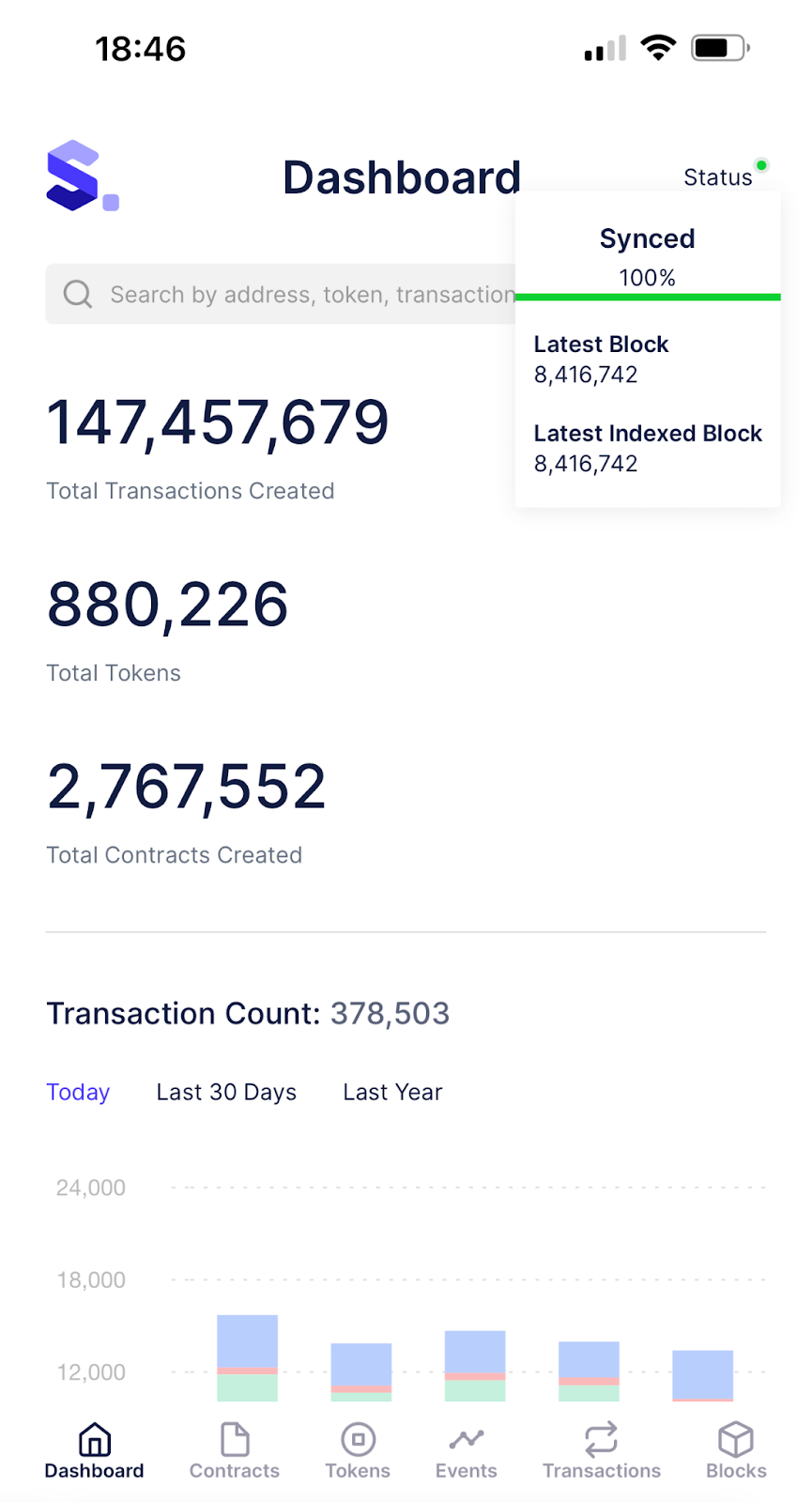
This feature is also supported on mobile devices.

<figure><img src="https://lh3.googleusercontent.com/jGueOTUK_Rr966Awg13mcIMGvpzxuNDCqYaZg3hCcTIMG9xhIu-gP_CYb1OW875PHUMhRERtiDoim_zGuiCoDiuanIHk0k355y0w09gTr8Fbu97Q_qy635Xy6iadaLXXpu2bqLlOqs5xUq26YcW0aW8" alt="" width="375"><figcaption><p>The syncing status on mobile</p></figcaption></figure>


# Roadmap

Upcoming and planned features

The roadmap provides an overview of the features the Chainlens team are currently working on and plan to work on in the coming months.

The list isn't exhaustive, nor final, but it provides perspective on where the product is headed.

If you'd like to contribute to or discuss any of the items, feel free to [jump on our Discord](https://discord.gg/pNP5cnpjFZ) to connect with the team.

### Q1 2024

* [x] NFT collection previews (small and large) on NFT home page
* [x] Placeholder images for NFTs without valid metadata
* [x] Proactive ingestion of all NFT metadata and images
* [ ] All new Chainlens UI 🚀🚀🚀
* [ ] Performance improvements on instances with very large datasets
* [ ] Network/protocol About page with community focussed links
* [ ] Fully Sourcify integration for partial and full matches against the entire contract history on network.

### 2024 Q2

* [ ] Dynamic sitemap generation to enhance SEO ranking
* [ ] Filtering in NFT views for specific NFT attributes
* [ ] Advanced search page
* [ ] Burned token stats
* [ ] New dashboard metrics

### Q3 2024

* [ ] ZK-EVM specific data views&#x20;
* [ ] Creator-specific views (view NFT assets associated with specific creator accounts)

## Completed milestones

### Q2 2023

* [x] Internal transaction support
* [x] Implementation of detailed NFT views in Chainlens including support for metadata-defined images and attributes
* [x] Node sync status

### Q3 2023

* [x] Public Sourciy Support
* [x] Substrate Frontier Pallet Support
* [x] Optimism Support

### Q4 2023

* [x] Polygon CDK support
* [x] Polygon ZK-EVM support
* [x] Accounts view
* [x] NFT, token and account-based navigation


# Release Notes

**Date added:** 26th March 2024

Web version: 8.3.8

Server version: 3.3.23

**Features:**

Recognize and display account type on the UI. (account/contract/token/nft)<br>

<figure><img src="/files/K2dJrdEFjyFikSpxwupk" alt=""><figcaption></figcaption></figure>

**Date added:** 20th March 2024

Web version: 8.3.18

Server version: 3.3.6

**Features:**

Decode function method names and parameters for not verified contracts.\
\
Before:\
![](/files/Mt2Fgq1M8sr0jjDRivmN)

After: \
![](/files/fohZNsCxxjBXHHNvHtgk)

**Date added:** 10th February 2024

Web version: 8.3

Server version: 3.3

**Features:**

* NFC Collections page redesigned
  * Added a column with the number of items and the ability to sort by different columns
  * Added a cover for the collection
  * Speed up page loading

    <figure><img src="/files/VvSfcUAXnqDAafkoHeST" alt=""><figcaption></figcaption></figure>
* Tokens page redesigned
  * Added information about the number of holders and the ability to sort by different columns
  * Speed up page loading

    <figure><img src="/files/KBrUdjkR1rRAtC9nrxw0" alt=""><figcaption></figcaption></figure>
* Optimized search through the search bar
* Adding account images on the internal txns page

<br>


# FAQs

If you cannot find an answer to your questions about Chainlens here, please get in touch.

### Which blockchains do you support?

Chainlens supports Ethereum and compatible networks that implement the [Ethereum JSON-RPC specification](https://ethereum.org/en/developers/docs/apis/json-rpc/).

This includes the Ethereum consensus clients:

* [Hyperledger Besu](https://besu.hyperledger.org/en/stable/public-networks/get-started/install/binary-distribution/)
* [Geth](https://geth.ethereum.org/docs/getting-started)
* [Erigon](https://github.com/ledgerwatch/erigon#erigon)
* [Nethermind](https://docs.nethermind.io/nethermind/)

It also supports Ethereum enterprise clients:

* [ConsenSys Quorum](https://consensys.net/quorum/)

There is also a version for Polkadot and Substrate networks, you can find out more information [here](https://github.com/web3labs/epirus-substrate).

### Where can I get support?

Please [email us](mailto:hi@web3labs.com?Subject=Sirato%20support) with your query and a member of our team will come back to you promptly.

### Can I apply custom branding to Chainlens?

Yes, if you take out one of our [commercial plans](https://www.web3labs.com/blockchain-explorer-sirato-plans).

### Do you support on-prem deployments?

Absolutely, please [contact the team](mailto:hi@web3labs.com?subject=Sirato%20on-prem) to discuss your requirements.

### Do you provide annual pricing?

Yes, paying annually is cheaper, you can [contact us](mailto:hi@web3labs.com?subject=Sirato%20annual%20plans) to arrange an annual plan.

### Are you hiring?

Please head to our [jobs portal](https://web3labs.jobs.personio.com/) for current listings.